Workflow & AI Automation

Take Repetitive Work Off Your Team’s Plate.

Automation should do more than save clicks. The right workflow can reduce duplicate entry, shorten cycle time, prevent missed steps, and use AI selectively where language or judgment makes traditional rules difficult.

Where Time Disappears

Manual Work Usually Hides in the Handoffs

The biggest automation opportunities are often not dramatic. They are the repeated steps people perform every day because systems, data, documents, and decisions do not flow cleanly.

Copying Between Systems

People re-key the same information into multiple applications or spreadsheets.

Chasing Approvals

Requests move through email, Teams, spreadsheets, or hallway conversations with little visibility.

Building the Same Reports

Employees repeatedly collect, format, and distribute information that could be generated automatically.

Handling Documents Manually

Forms, PDFs, emails, images, and attachments need to be read, classified, routed, or entered.

Searching for the Right Information

Employees spend time locating policies, customer history, project data, or internal knowledge before they can act.

Doing Repetitive Decisions

Rules-based choices—or AI-assisted review—can reduce the number of routine items that require human attention.

Automation Capabilities

Automate the Process, Not Just One Click

Good automation connects the full business workflow: what starts the work, what information is needed, what decisions are made, what systems change, and what people still need to review.

Workflow Automation

Move work through repeatable steps with fewer manual handoffs.

  • Routing and approvals
  • Notifications and escalations
  • Status tracking
  • Rules and exception handling

System-to-System Automation

Let software move information instead of employees.

  • API integrations
  • Scheduled data exchange
  • File imports and exports
  • Database synchronization

Document & Email Processing

Turn incoming unstructured information into structured work.

  • Form and document intake
  • Email classification
  • Data extraction
  • Routing and follow-up

AI-Assisted Workflows

Use AI where judgment, language, or content understanding adds value.

  • Summaries and classification
  • Drafting and extraction
  • Knowledge assistance
  • Human review checkpoints

Operational Automation

Reduce repetitive internal work without rebuilding every system.

  • Scheduled jobs
  • Business-rule engines
  • Alerts and monitoring
  • Batch processing

Customer & Employee Self-Service

Move routine requests closer to the person who needs the result.

  • Portals and guided forms
  • Status requests
  • Document generation
  • Knowledge access
AI Without the Hype

AI Is Useful When It Handles Ambiguity. Traditional Automation Is Better When the Rules Are Clear.

If a process can be described as exact rules, conventional software is often cheaper, faster, and more predictable. AI becomes valuable when the work involves language, documents, classification, summarization, pattern recognition, or inputs that are difficult to reduce to fixed rules.

The best solution may use both: deterministic software for the critical workflow and AI for the parts that benefit from flexible interpretation.

Where we would be cautious

  • Fully autonomous decisions with meaningful financial, legal, or safety consequences
  • Processes with poor or inconsistent source data
  • Using AI only because it is fashionable
  • Automating a broken process before understanding it
  • Replacing human review where errors are expensive
A Practical Path

Start With the Highest-Friction Workflow

1. Find the Repetition

Identify where people copy, wait, search, reformat, route, or repeat work.

→

2. Simplify the Process

Make sure the workflow makes sense before software makes it faster.

→

3. Automate & Measure

Automate a focused slice, measure time/error reduction, then expand where the value is proven.
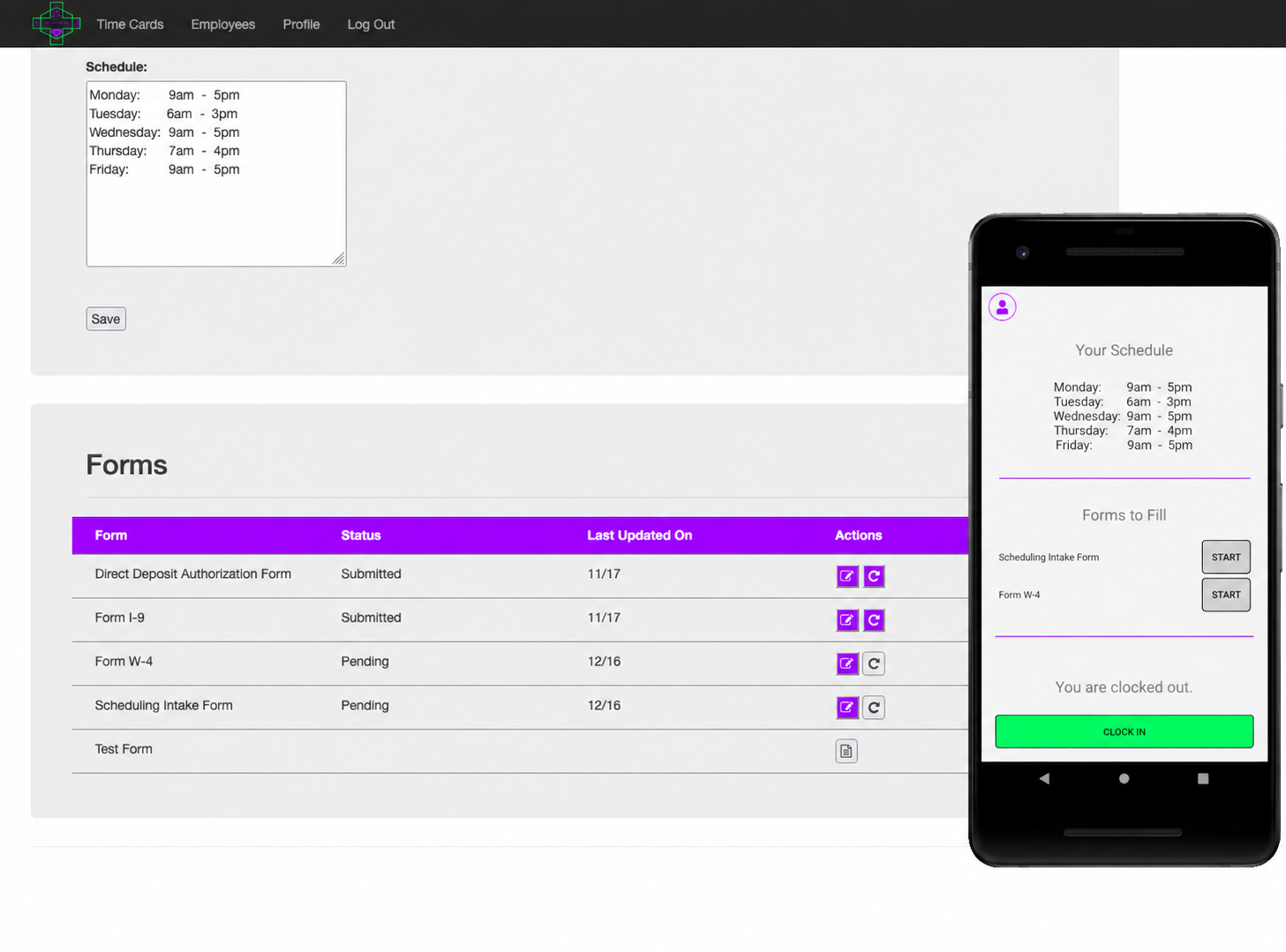
Employee scheduling, forms, and workflow software application
Workflow Application Example

Keep Schedules, Forms, and Daily Work Moving

A custom workflow application can guide employees through the right steps, keep forms and schedules organized, and make day-to-day processes easier to manage across desktop and mobile devices.

Explore more projects →

Client Perspective

What a Client Says

“A highly professional company that not only knows how to listen to the needs, but advises, adapts and often improves on the initial software goals. The result...better more accurate quoting, better outcomes for the task at hand. Could not recommend this company more. They go above and beyond.”

— Martin King, President, GAPP Marketing | Promotional Products & Marketing
Examples

Workflow & Automation Projects

The common thread is not a specific technology. It is reducing manual effort, delay, and inconsistency in a business process.

Workflow

Applicant Onboarding

Guide users through data collection, documents, signatures, and downstream processing.

Automation

Document Processing

Extract and route information from incoming files or forms with review where needed.

Integration

Order Handoff Automation

Move approved transactions into downstream systems without duplicate entry.

Reporting

Automated Report Distribution

Generate and send the right information to the right people on a schedule or event.

AI-Assisted

Knowledge & Content Workflow

Help staff find, summarize, classify, or draft from approved business information.

Operations

Approval & Exception Workflow

Route routine items automatically while surfacing only exceptions that need attention.

FAQ

Common
Questions

A good rule of thumb is this: if a task is repetitive, rule-based, and performed frequently, it’s probably a good candidate for automation.

Some common examples include:

  • Entering the same information into multiple systems

  • Processing invoices, orders, or other business documents

  • Moving data between spreadsheets and software applications

  • Generating reports and distributing them to stakeholders

  • Sending notifications, reminders, or status updates

  • Routing approvals and managing workflow steps

  • Tracking inventory, production, or service activities

In many cases, the biggest opportunities aren’t found in one large process. They’re found in dozens of small tasks that consume valuable time throughout the day.

The best automation projects typically eliminate repetitive work, reduce errors, improve visibility, and allow employees to focus on activities that require human judgment and expertise.

If you’re unsure whether a process can be automated, that’s often a sign it’s worth exploring. Many companies are surprised by how much manual work can be streamlined with today’s automation and AI tools.

The impact varies from one process to another.

Some automation projects save a few minutes each day. Others eliminate hours of repetitive work every week. The biggest gains usually come from processes that involve manual data entry, moving information between systems, processing documents, or repeatedly performing the same set of steps.

For example, one client was spending approximately five hours each week manually entering data into a system. The process was not only time-consuming but also prone to occasional mistakes. By automating the workflow, the same task was reduced to less than 30 seconds and produced more consistent results.

The goal of automation isn’t simply to save time. It’s also about reducing errors, improving consistency, increasing visibility, and allowing your team to focus on work that requires human judgment rather than repetitive tasks.

Most automation projects fall into one of three ranges:

  • Simple automations: $2,000–$5,000

  • Mid-range automations: $5,000–$15,000

  • Complex automations: $15,000–$50,000+

Simple automations typically include things like notifications, approvals, document routing, or basic data transfers between systems. Mid-range projects often involve multiple systems, more sophisticated business rules, or AI-assisted document processing. Complex projects combine several of those elements at scale, involve extensive integrations, or require custom AI-powered workflows across an entire business process.

One thing that surprises many clients is that automation projects often cost less than expected. Because we are improving an existing process rather than building an entirely new application from scratch, the investment can be more modest than a full software development project.

When evaluating cost, we encourage clients to focus on the return rather than the number alone. If an automation saves hours of manual work each week, reduces errors, or improves response times, the investment can often pay for itself surprisingly quickly.

The best way to determine where your project falls is to start with the process itself. Once we understand how the work is currently being done, we can identify the right approach and give you a realistic estimate.

Absolutely. In fact, that’s how many of the most successful automation projects begin.

Rather than trying to automate an entire department or business process all at once, we often recommend starting with a specific problem that delivers clear value. This might be eliminating a manual data entry task, automating a document workflow, improving a reporting process, or connecting two systems that currently require manual effort.

Starting small allows your team to see results quickly, gain confidence in the solution, and identify additional opportunities for improvement. It also reduces risk because you’re making a measured investment rather than committing to a large, all-encompassing project from the start.

Many of our automation projects evolve over time. What begins as a simple workflow improvement often becomes the foundation for additional automations as the business discovers new opportunities to save time, reduce errors, and improve efficiency.

Our goal is to help you identify the highest-value starting point and then expand only when it makes sense for your business.

Workflow automation follows predefined rules and steps. If a specific event occurs, the system performs a predetermined action.

For example, when a customer submits an order, the system might automatically create a job, notify the appropriate team members, update inventory records, and send a confirmation email. The process is predictable because the rules are clearly defined.

AI automation takes things a step further by helping the system make decisions, interpret information, or handle situations that don’t always follow the same pattern.

For example, AI might read invoices from different vendors, extract key information from emails, classify documents, summarize customer inquiries, or identify unusual transactions that deserve attention.

In practice, many of the most effective solutions combine both approaches. Workflow automation handles the repetitive process, while AI helps manage the parts that traditionally required human review or judgment.

Many business owners assume AI is only for large companies with big IT departments, dedicated data science teams, or major technology budgets. That assumption holds a lot of companies back from improvements they could be making right now.

The reality is that most companies are more ready for AI than they realize.

You don’t need a large IT department, a team of data scientists, or a complete digital transformation to benefit from AI. In many cases, AI can be introduced incrementally by improving a specific process that already exists. Good candidates often involve tasks such as processing documents, extracting information from emails, categorizing requests, generating summaries, answering routine questions, or helping employees find information more quickly.

The bigger question isn’t usually whether you’re ready for AI. It’s whether you have a business process that could benefit from AI assistance. And if your team is spending time on repetitive manual work, chances are the answer is yes.

We often encourage companies to start small. A focused project that saves time, reduces errors, or improves responsiveness can provide valuable experience and measurable results without requiring a major investment or organizational change.

If you’re already asking where AI could help your business, you’re probably more ready than you think.

Most automation projects don’t fail because of technology. They fail because the underlying process isn’t fully understood, isn’t consistently followed, or isn’t a good candidate for automation in the first place.

We’ve seen this enough times that it directly shaped how we work.

One of the most common mistakes is trying to automate a process before it has been clearly defined. Automation is very good at improving a good process, but it can also amplify inefficiencies if the process itself needs work. Part of our job is helping you think through that before any automation work begins.

Another common issue is focusing on the technology rather than the business objective. The most successful automation projects start with a clear goal, such as reducing manual data entry, improving response times, eliminating errors, or increasing visibility into operations.

We’ve also found that early and frequent user feedback is critical. The people performing the work every day often provide insights that aren’t obvious from a process diagram or requirements document. That’s why we build regular reviews and status updates into every project rather than disappearing for weeks and returning with something that missed the mark. If something isn’t heading in the right direction, we’d rather catch it early than discover it at the end.

The best automation projects start with a well-understood process, a clear business objective, and a willingness to improve the workflow before automating it. That’s the approach we bring to every engagement.

That’s one of the reasons we prefer to implement automation in stages rather than treating it as a one-time event.

In most cases, the first version of an automated process provides valuable insights into how the workflow actually operates in a real-world environment. Users often identify opportunities for improvement, exceptions that weren’t anticipated, or adjustments that make the process more effective.

Rather than waiting until the end of a project to discover those things, we encourage regular reviews and feedback throughout the implementation process. That allows us to make adjustments early, when they’re easier and less costly to address.

It’s also important to remember that automation is not an all-or-nothing decision. Many organizations start by automating part of a process, evaluate the results, and then expand from there. This approach reduces risk while allowing the solution to evolve based on real-world experience.

Our goal isn’t simply to automate a process. It’s to help create a process that works better than it did before.

In our experience, automation and AI are most often used to eliminate repetitive tasks, not eliminate people.

Many businesses are already struggling to find enough qualified employees, and their goal isn’t to reduce headcount. Their goal is to allow existing employees to spend less time on manual data entry, repetitive paperwork, and routine administrative tasks so they can focus on higher-value work.

AI can be particularly effective at handling tasks such as reviewing documents, extracting information, drafting content, summarizing data, or identifying patterns. However, most business processes still require human judgment, experience, relationship management, and decision-making. AI can assist with those activities, but it rarely replaces them entirely.

For example, if an employee spends several hours each week entering information from one system into another, automation may be able to handle that task in seconds. The employee can then spend more time helping customers, solving problems, improving processes, or performing other work that creates value for the business.

We’ve also seen automation and AI help companies grow without adding staff at the same rate as their workload increases. By making existing processes more efficient, businesses can often handle more work with the team they already have.

The most successful implementations don’t focus on replacing people. They focus on allowing people to spend less time on repetitive work and more time on the work that humans do best.

In many cases, yes. One of the biggest advantages of automation is that it often allows you to improve existing processes without replacing the software you already use.

We regularly work with accounting and financial systems like QuickBooks, ACH Transfers, CRM platforms like HubSpot, ERP systems, manufacturing and shop floor systems, databases, spreadsheets, and a wide range of third-party applications.

For example, automation can move data between systems, eliminate duplicate data entry, process documents, trigger notifications, generate reports, or route information to the right people at the right time. In many cases, the systems your team already depends on every day can become significantly more powerful simply by connecting them and letting information flow automatically between them.

The easiest integrations typically involve systems that provide APIs or other standard methods for exchanging data. However, even when direct integration isn’t available, there are often alternative approaches worth exploring.

If your automation project depends on connecting multiple systems, we will evaluate the available options early in the process and give you an honest assessment of what is possible, what is practical, and any limitations you should be aware of before the project begins.

The timeline depends on the complexity of the process being automated and the systems involved, but here are realistic ranges to set expectations:

  • Simple automations: Days to a couple of weeks
  • Mid-range automations: A few weeks to a couple of months
  • Complex automations: Several months

Simple automations such as notifications, approvals, document routing, or basic data transfers can often be up and running surprisingly quickly. Mid-range projects involving multiple systems or more sophisticated business rules typically require a few weeks of planning, development, and testing. Complex projects that combine multiple systems, custom AI-powered workflows, or large-scale process changes naturally take longer to design, build, and validate properly.

One advantage automation projects have over full software development projects is that they are usually focused on a specific business process rather than an entire application. That means it is often possible to start seeing real benefits quickly, even on larger projects, as individual pieces of the automation are completed and put to work.

The projects that move fastest typically have a well-defined process, clear objectives, and timely feedback from the people who perform the work every day.

These are two of the most common concerns we hear, and they’re worth addressing together.

On the accuracy side, it depends largely on the task being performed. Some activities, such as extracting information from structured documents, categorizing requests, summarizing content, or identifying patterns in data, can often be performed with a high degree of accuracy. More complex tasks that require judgment or interpretation may need human review as part of the process.

The key is matching the right level of automation to the right business process. In some situations, AI can operate independently. In others, the best approach is to have AI perform the initial work and route exceptions or uncertain results to a person for review. A process that occasionally requires human verification may still provide significant time savings if it eliminates the majority of the manual effort.

On the data side, many people assume AI projects require massive amounts of perfectly organized data. For many business automation projects, that simply isn’t true. AI can often process invoices, extract information from emails, categorize documents, summarize content, or assist with customer inquiries without requiring years of historical data or extensive preparation.

That said, the quality of your data does matter. Better data generally leads to better results. If important information is inconsistent, incomplete, or difficult to access, part of the project may involve improving how that information is captured before automation can work effectively.

The good news is that you don’t need perfection to get started. We recommend focusing on the business problem first. Once we understand what you’re trying to solve, we can determine whether your existing data is sufficient or what improvements might be needed.

Most automations continue to evolve after they are deployed.

Business processes change, new systems are introduced, requirements evolve, and opportunities for additional automation are often discovered once the initial solution is in use. We provide ongoing support, maintenance, troubleshooting, and enhancement services to help clients continue improving their automated workflows over time.

Some clients engage us regularly to identify new automation opportunities and optimize existing processes, while others contact us only when changes are needed. We don’t believe every organization requires the same level of support, so we work with you to find an approach that fits your business.

And if you ever decide to use another support provider, that’s your choice. The goal is to create automation solutions that deliver long-term value to your business, not to create dependency on Tornado Technologies.

Next Step

Where Is Your Team Losing Time Every Week?

Start with one frustrating workflow. We can help determine what should be simplified, what can be automated, and whether AI adds real value.

Schedule A Call